When WhatsApp Blocks Your AI
Table of Contents
When WhatsApp Blocks Your AI - Building an alternative
My self-hosted AI assistant worked perfectly for weeks. Then WhatsApp decided to block it.
But Telegram made an offer I couldn’t refuse.

Here’s how I built two alternatives in a weekend with Cursor.
The Problem
I had built a private AI assistant running on a Raspberry Pi 5.
It used WhatsApp as the interface—I could message my AI, get responses, even have it speak through a connected speaker.
Then one day: nothing. No responses. The WhatsApp session was dead.
Most likely, WhatsApp’s anti-bot detection had flagged my assistant and blocklisted it.
Fair enough though—it was a bot; it’s hard to distinguish malicous ones from hobby projects.
GÖD’S GATE
Run it yourself?
If you want to run it yourself, clone this GitHub repo and follow the setup.
Donations?
You can also toss me a coin: Paypal
Two Solutions
Rather than fight WhatsApp’s terms of service, I built two new interfaces:
┌─────────────────────────────────────────────────────────────────────────┐
│                     PROMETHEUS AI - INTERFACES                          │
├─────────────────────────────────────────────────────────────────────────┤
│                                                                         │
│   ╔═══════════════╗         ╔═══════════════╗         ╔═══════════════╗ │
│   ║   WhatsApp    ║         ║   Telegram    ║         ║  Web Portal   ║ │
│   ║   (Blocked)   ║         ║               ║         ║               ║ │
│   ╚═══════╤═══════╝         ╚═══════╤═══════╝         ╚═══════╤═══════╝ │
│           │                         │                         │         │
│           ╳                         ▼                         ▼         │
│       BLOCKED              ┌─────────────────────────────────────┐      │
│                            │           OLLAMA + GEMMA            │      │
│                            │         (Local AI Brain)            │      │
│                            └─────────────────────────────────────┘      │
│                                            │                            │
│                                            ▼                            │
│                                    ┌─────────────┐                      │
│                                    │  Piper TTS  │──▶ 🔊                │
│                                    └─────────────┘                      │
│                                                                         │
└─────────────────────────────────────────────────────────────────────────┘
Solution 1: Telegram Bot
Why Telegram?
| Telegram | |
|---|---|
| Unofficial API (reverse-engineered) | Official Bot API |
| Aggressive anti-bot detection | Bots are first-class citizens :D |
| Can be blocked anytime | Stable, documented, supported |
| Requires phone number + QR | Just needs an API token |
Telegram wants you to build bots. They provide documentation, rate limits, and a proper API. No reverse-engineering required.
How It Works
┌─────────────┐    ┌──────────────────┐    ┌─────────┐    ┌────────┐
│  Telegram   │───▶│  Telegram Bridge │───▶│ FastAPI │───▶│ Ollama │
│    App      │◀───│    (Python)      │◀───│  (API)  │◀───│(Gemma) │
└─────────────┘    └──────────────────┘    └─────────┘    └────────┘
- Create a bot via @BotFather (2 minutes)
- Get your user ID for authorization
- Deploy a Python container that polls Telegram’s API
- Messages flow to Ollama, responses flow back
The entire setup took a few hours.
Features
- Direct messages — Just like texting
- Group support — Add the bot to groups, trigger with “Prometheus”
- Voice output — Write “speak” to have the Pi read the response aloud
- Context memory — Remembers recent conversation
Solution 2: Web Portal
Why a Web Interface?
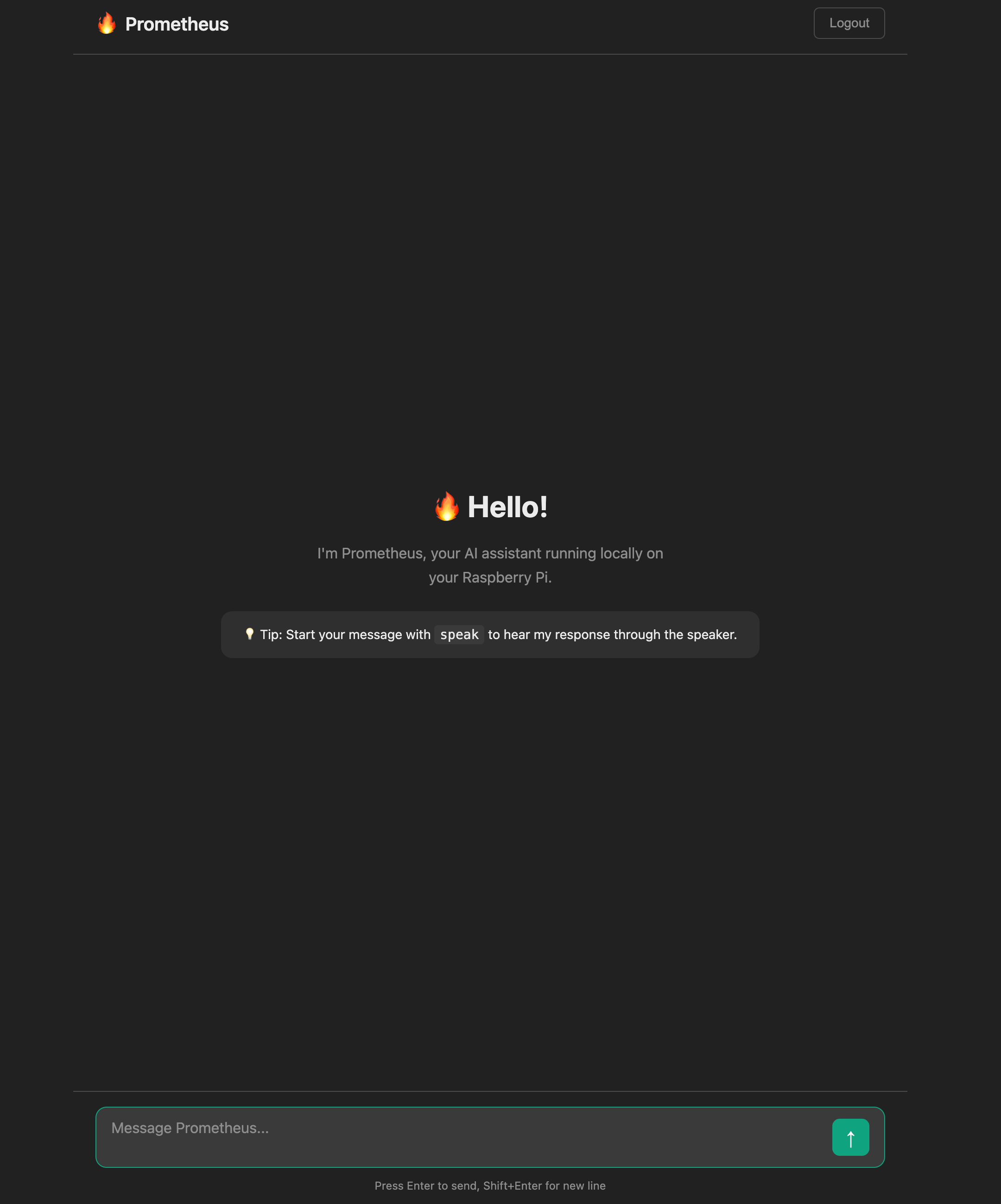
Sometimes you want to chat from a laptop. Or you don’t want to install another messaging app. Or you want something that looks like ChatGPT but runs entirely on your hardware.
The Interface
A clean, minimal chat interface:
Security
- Password protected — Simple authentication
- Cloudflare Tunnel — Secure external access without port forwarding
- No data collection — All processing happens locally
External Access
Using Cloudflare Tunnel, I can access my AI from anywhere:
https://chat.my-domain.com → Cloudflare Tunnel → Pi → Ollama
No open ports, no dynamic DNS hassles, just secure tunneling.
Technical Details
All three interfaces (WhatsApp, Telegram, Web Portal) connect to the same backend:
# docker-compose.yml (simplified)

services:
  ollama:        # The AI brain
  piper-tts:     # Text-to-speech
  whatsapp:      # WhatsApp bridge (blocked)
  telegram:      # Telegram bridge (new!)
  web-portal:    # Web interface (new!)
Each interface is a separate Docker container. Adding a new interface doesn’t affect the others. Removing one doesn’t break anything.
The full code is available on GitHub.
What’s Next
Connect the chatbot to the Internet.